
Tip Calculator
Skol Games LLCFood & Drink
4.83.44K Reviews
- Version
- 3.1.1
- Installs
- 500.00K
- Age Rating
- Everyone
Screenshots
Our Review of Tip Calculator
 Analysis by Appyee
For a small app with one clear job, Tip Calculator gets the important moment right: it helps turn a table full of opinions about the check into a number everyone can act on. I find it most useful when the arithmetic is easy to get wrong under pressure, not because tipping itself is complicated, but because the group is ready to leave and nobody wants to hold up the table.
That narrow focus is also the app’s main trade-off. It is a practical tool in the Food & Drink category, not a full dining companion or a shared-expense manager. If all you need is a quick tip and an even split, that simplicity is a strength. If your group needs a detailed record of who ordered what, you will still have to agree on the amounts before entering anything.
A quick answer when the check arrives
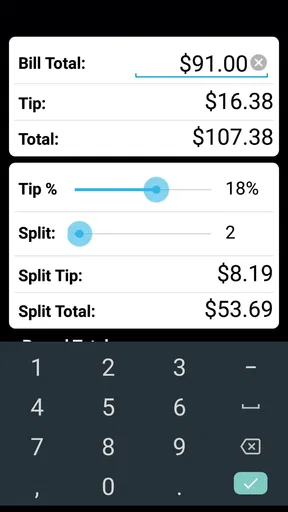
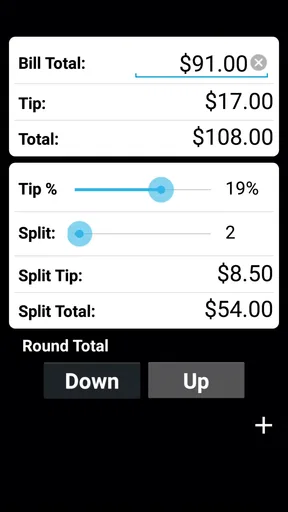
The basic workflow is easy to understand: enter the bill, choose a tip percentage, and set how many people are sharing. The app then gives you the tip and the per-person total. I like this because it keeps the decision visible. Instead of passing around a phone to inspect someone’s mental maths, the group can settle on a percentage and see what that choice means for each person.
That is especially helpful when the check arrives during a busy meal and people are talking over one another. You can use the result as a starting point, then adjust the tip or head count if the group changes its mind. The calculator does not decide what a fair tip is; it simply makes the consequences of your choice easier to see.
Useful controls, with a limit to what “splitting” means
The adjustable tip percentage and number of diners make the app more useful than a bare calculator. Setting a default percentage can save a step if you usually begin with the same amount, while changing the party size gives you a quick even split. The description of being able to adjust what each person pays also suits small exceptions, such as covering a friend’s dessert.
There is an important distinction, though: a flexible total is not the same as tracking every diner’s individual order. If one person had a salad and another ordered a steak, the app can help with the calculation only after the group has decided how to account for that difference. I would not rely on it to identify who owes what from an itemized receipt; it is best treated as a calculator for amounts you have already worked out.
Where it fits beside a phone calculator
A regular calculator can handle a tip, and for a meal by yourself it may be all you need. The benefit here is that the tip percentage and party size are part of the same task, so you do not have to calculate the gratuity, add it to the bill, and divide the result in separate steps. That can reduce small arithmetic slips when you are doing everything in your head or on a basic calculator.
Compared with a dedicated bill-splitting service, this app is the more direct choice when the group is physically together and can agree on the numbers. A more involved expense tool is a better fit when people pay separately, need to settle up later, or want a record of shared costs. I see this app as the quick answer at the table, not a replacement for that kind of bookkeeping.
Offline use and travel
Being able to calculate without internet access is a useful practical detail: a poor signal in a restaurant will not stop you from entering the bill and working out a split. The app also supports multiple currencies, which can help when you are eating abroad. I would still check that the currency shown matches the bill before relying on the result, especially if you have recently switched between places or are paying in an unfamiliar currency.
For a group meal, a simple habit makes the result more dependable: agree first on whether the tip should be calculated from the pre-tax or final amount, then enter the figure everyone has chosen. Different people may have different expectations about that detail. The calculator can do the arithmetic, but a quick conversation prevents a mathematically correct total from becoming a social disagreement.
What Exactly Does the Tip Calculator Do?
So, you've just downloaded the Tip Calculator app, and you're wondering what it does. It's basically the perfect tool for anyone who wants to calculate tips quickly and efficiently. You just plug in the bill amount, choose your desired tip percentage, and voila! The app tells you exactly how much you should tip, and even better, it can split the total bill among your group. No more fumbling with mental math after a glass of wine!
User-Friendly Interface
The first thing you'll notice is how easy it is to navigate. The interface is clean, with no unnecessary clutter. It's just you, the bill amount, and a few sliders. You can adjust the tip percentage and the number of people sharing the bill with a simple swipe. It's intuitive, and you won't need a tutorial to figure it out.
Customization Galore
One of the coolest features is how customizable it is. You can set your default tip percentage, which is great if you're the kind of person who always tips 20%. Plus, if you're splitting the bill, you can easily adjust how much each person pays. Want to cover your friend's dessert? No problem. The app has got you covered.
Why You Need This App
Picture this: You're at a bustling restaurant, the server drops off the check, and everyone looks at each other awkwardly. Someone suggests splitting it evenly, but you only had a salad while others enjoyed steak. Now, this is where the app truly shines. It's perfect for group outings because it eliminates any guesswork and ensures everyone pays their fair share.
The Nitty-Gritty Details
Let's get into the specifics. The app works offline, so you don't have to worry about spotty internet connections ruining your calculations. And if you're traveling? No worries. It supports multiple currencies, so you can calculate tips in euros, pounds, or whatever your heart desires!
Those conveniences make it a sensible choice for spontaneous meals, too. Imagine finishing a casual dinner with colleagues, where one person is leaving early and the rest want to divide the remaining amount. You can change the head count and see the new even share without reopening a browser or trying to remember a percentage formula. For a small group that has already agreed on the split, that one-screen calculation is often enough.
Small habits that prevent awkward totals
I would use the default tip setting as a starting point rather than an automatic decision. A saved preference can speed up familiar dinners, but the appropriate amount may vary with the service, local custom, or the kind of bill. Before tapping through, pause long enough to confirm the percentage and the bill amount; convenience is valuable only if the inputs reflect what the group actually wants.
It also helps to decide how to handle rounding before everyone pays. Dividing a total among several people can leave tiny differences, and people may prefer one person to cover the remainder rather than debate a few cents at the table. The app’s quick split is most effective when someone takes responsibility for communicating the rounded amount clearly.
Who will appreciate the simple approach
I would recommend it to people who dine out with friends, couples who want a fast check on a gratuity, and travelers who value having a calculator that does not depend on a connection. It is particularly useful for the person who often ends up doing the maths for the table. Rather than being the group’s accountant, you can enter the agreed figures and share a clear result.
On the other hand, skip it if you mainly need to scan receipts, assign dishes to particular people, track reimbursements over time, or coordinate payments with friends who are not present. Those needs call for a more comprehensive bill-sharing tool. And if you rarely tip or split checks, your phone’s built-in calculator may already be sufficient; installing a dedicated app will not add much to that occasional task.
A real-world check before you pay
Say four friends finish dinner, but one person had only a light meal and another offered to contribute extra for a shared dessert. I would first agree on the base bill and tip approach, then use the calculator for the amount that is meant to be split evenly. Any personal adjustment can be discussed separately and reflected in what each person hands over. This keeps the app’s arithmetic useful without pretending that an even split is automatically fair for every table.
That distinction is the most important thing to understand before using it: the tool reduces calculation friction, but the group still makes the social decisions. It cannot settle a disagreement about who ordered what or whether a tip should be based on a particular subtotal. Used with clear inputs, though, it can keep those conversations brief and help everyone leave with the same understanding.
The Nitty-Gritty Details
Let's get into the specifics. The app works offline, so you don't have to worry about spotty internet connections ruining your calculations. And if you're traveling? No worries. It supports multiple currencies, so you can calculate tips in euros, pounds, or whatever your heart desires!
On iOS, the app is published by Skol Games LLC, and its current version is 3.1.0. It is free to download, with in-app purchases ranging from $2.99 to $7.99 per item. I would treat the free download as a low-friction way to try the basic workflow, then check the purchase details in the app if you are considering spending money. The app is rated for Everyone and requires iOS 9 or later, which makes the age suitability straightforward for general use.
Its reception is strong: it has a 4.8 average from around 12 thousand ratings, alongside roughly 3.4 thousand written reviews, and it has been installed over 500 thousand times. It first appeared on June 27, 2012, so this is an established, focused utility rather than a new all-in-one dining platform. That history and audience interest are reassuring, but neither changes the central question for me: do you want a quick tip and split calculation, or do you need a complete way to manage shared expenses?
Final Thoughts
In short, the Tip Calculator app is a must-have for anyone who dines out regularly. It's not just about calculating tips; it's about making dining out less stressful and more enjoyable. Whether you're on a date, dining with family, or out with friends, this app is your new best friend.
So, next time you're out, and the check arrives, whip out your phone, open the app, and impress everyone with your quick, accurate calculations. You might just become the unofficial bill-splitting hero of your group!
My verdict is positive, with a clear boundary: this is a handy specialist rather than an essential app for everybody. Its straightforward tip and even-split workflow, offline usefulness, and currency support address a familiar moment without making it feel like a finance project. I would keep it in mind if group meals regularly leave you reaching for mental arithmetic; if you need item-by-item accounting or ongoing expense records, choose a fuller bill-splitting option instead.
Verdict
Strengths of Tip Calculator
- Easy to use interface for quick calculations.
- Supports multiple currencies for travel.
- Customizable tip percentages.
- Splits bills among multiple people easily.
- No ads for a seamless experience.
Limitations of Tip Calculator
- Lacks offline functionality.
- Limited to basic tipping features only.
- No receipt scanning capability.
- Requires manual input for tax rates.
- Lacks integration with payment apps.
Similar Picks in This Category
View All
Rappi: Food Delivery, Grocery
Rappi, Inc - Delivery3.5

McDonald’s: Cupons e Delivery
Arcos Dorados4.3

Swiggy: Food Instamart Dineout
Swiggy4.7

Blinkit: Groceries & more
Blinkit4.8

foodpanda: food & groceries
Foodpanda GmbH a subsidiary of Delivery Hero SE4.0

Zomato: Food Delivery & Dining
Zomato4.7
Frequently Asked Questions
How does the Tip Calculator app work?
The Tip Calculator app simplifies the process of calculating tips by allowing you to enter the bill amount and select a tip percentage. It instantly provides the tip amount and total bill, helping you to quickly determine how much you should tip your server. Some versions also allow you to split the bill among multiple people.
Is the Tip Calculator app free to use?
Many Tip Calculator apps are free to download and use. However, some may offer premium features or an ad-free experience through in-app purchases. Always check the app's description on the App Store or Google Play for details about any additional costs.
Does the Tip Calculator app require an internet connection?
Most Tip Calculator apps do not require an internet connection to function. They perform calculations locally on your device, making them convenient for use in restaurants or other locations where Wi-Fi may not be available.
Can I customize the tip percentages in the Tip Calculator app?
Yes, many Tip Calculator apps allow you to customize the default tip percentages to suit your preferences. You can often adjust settings to add or remove percentages, ensuring the app aligns with your tipping habits or local customs.
Is the Tip Calculator app available for both Android and iOS?
Yes, most Tip Calculator apps are available on both Android and iOS platforms. Be sure to check your specific app store for the app you prefer, and verify that it is compatible with your device's operating system version.
